where does Vibe save transcripts
Where Does Vibe Save Transcripts?
Vibe does not silently put every finished transcript in one fixed folder. The text appears inside the desktop app first. To create a file, choose an export format, click the download-shaped Save Transcript button, and confirm the destination in the Windows, macOS, or Linux save dialog.
Where does Vibe save transcripts? The short answer
If you finished transcription but cannot find a file in Downloads or Documents, it may not have been exported yet. Vibe suggests a filename from the source media, but the final folder is the one you approve in the system dialog.
A completed transcript can remain visible in Vibe without a separate file on disk.
Save Transcript opens the operating system save dialog rather than using one universal Vibe folder.
After a successful save, the Find Here action opens the exact location.
Save a Vibe transcript step by step
- Review the finished text in Vibe.
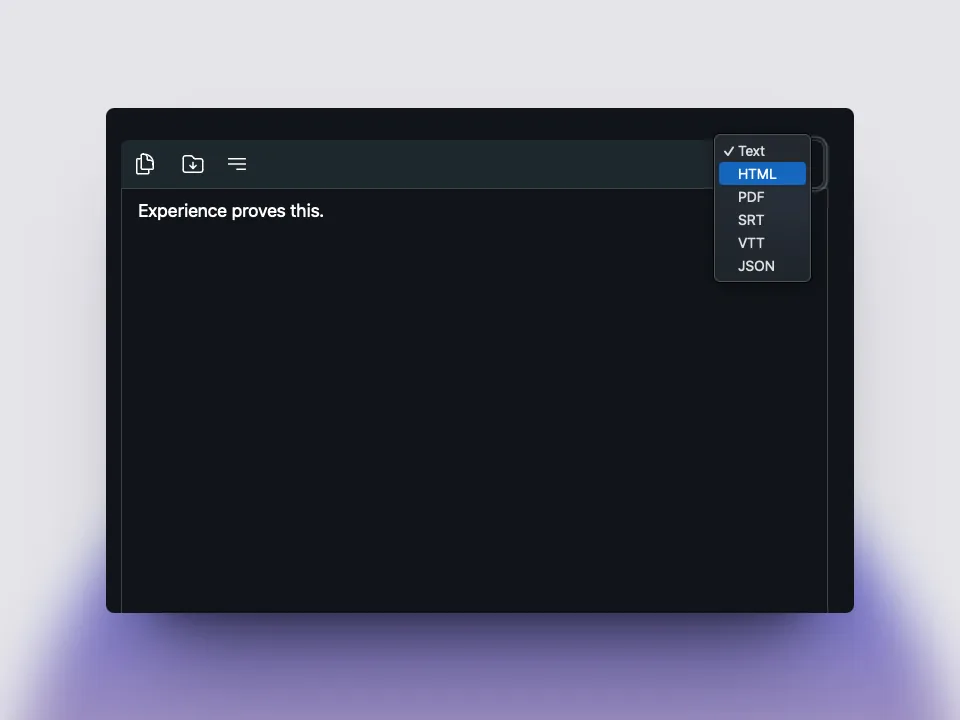
- Choose text, DOCX, SRT, VTT, JSON, CSV, Markdown, HTML, or PDF.
- Click the download-shaped Save Transcript icon above the editor.
- Check the proposed filename and folder.
- Select Save, then use Find Here to verify the result.
Why the transcript is visible but no file exists
Vibe separates transcription from export. Speech recognition can finish and display an editable result without writing a TXT, SRT, DOCX, or other document to disk. This prevents unexpected files from appearing in an arbitrary folder and lets you choose a destination for each project.
If the text is still visible, export it before closing the project or replacing the source media. Searching Downloads immediately after transcription may return nothing because no export has happened. The installer directory and model directory are not transcript folders.
Use the save icon and confirm the destination
The transcript toolbar contains a download-shaped save icon. Vibe calculates a suggested output name from the original media and selected extension, then opens the native save dialog. The final location is the path shown and approved there.
After writing the file, Vibe displays a success notification. Its Find Here action opens the saved path, making it the fastest way to confirm the export before starting another recording.
Choose the right export format
Use plain text or DOCX for reading and editing, SRT or VTT for timed captions, JSON or CSV for structured processing, Markdown or HTML for publishing, and PDF for a fixed document. The selected format changes the extension and may change timestamps or speaker labels.
If the main problem is finding the result, create a clear project folder before export and use a familiar extension. Keep a timed SRT or VTT master when captions may be needed later, even if you also save a clean text copy.
How to find a transcript you already saved
Check the folder selected in the save dialog, then search recent files for the original audio or video filename with another extension. On Windows use Home or Recent, on macOS use Finder Recents or Spotlight, and on Linux check recent documents and the project directory.
Also inspect OneDrive, iCloud Drive, external drives, or other mounted locations you may have chosen. If no export exists, return to Vibe and save again to a known folder. Copying text to the clipboard is useful, but it is not a durable file backup.
Before you close Vibe
Open the saved file and confirm it includes the latest corrections. Keep source media, transcript, subtitles, and edited copies in one named project folder so later revisions do not overwrite the wrong draft.
This guide verified the official Vibe v3.2.2 release published on September 5, 2026. Interface details can evolve, so the current in-app Save Transcript control and official GitHub release remain the final references.
FAQ
Vibe transcript file questions
Does Vibe automatically save every transcript?
No fixed transcript file is created merely because transcription finished. Use Save Transcript and approve the destination.
What folder does Vibe use by default?
Vibe proposes a path based on the source file, but the final folder is the one approved in the system dialog.
Can I save without timestamps?
Choose a text or document format instead of SRT or VTT when timed subtitle cues are not needed.
Why is the transcript not in Downloads?
It may not have been exported, or a different folder may have been selected.
Which formats can Vibe export?
The current app offers text, HTML, PDF, DOCX, SRT, VTT, JSON, CSV, and Markdown options.
offline transcription with vibe
download vibe and start with a short local transcription test.
Download Vibe